
SMS Verification API: Complete Developer Guide (2026)

What an SMS Verification API Actually Does
An SMS verification API lets your application request a phone number, receive a one-time code sent to that number, and confirm a user's identity without you owning any physical SIM cards. You call an endpoint, a virtual number is assigned, the target service (WhatsApp, Google, Telegram, and so on) sends its code, and your app reads that code back through the API.
This is different from an SMS sending API. A sending API pushes messages out. A verification API pulls incoming codes in. Developers building automation, QA test rigs, multi-account tooling, or onboarding flows usually need the second type.
Throughout this guide we use SMSBulk, the platform behind this blog, as the reference implementation, because its REST design mirrors what most modern providers expose. The concepts transfer to any provider you evaluate.
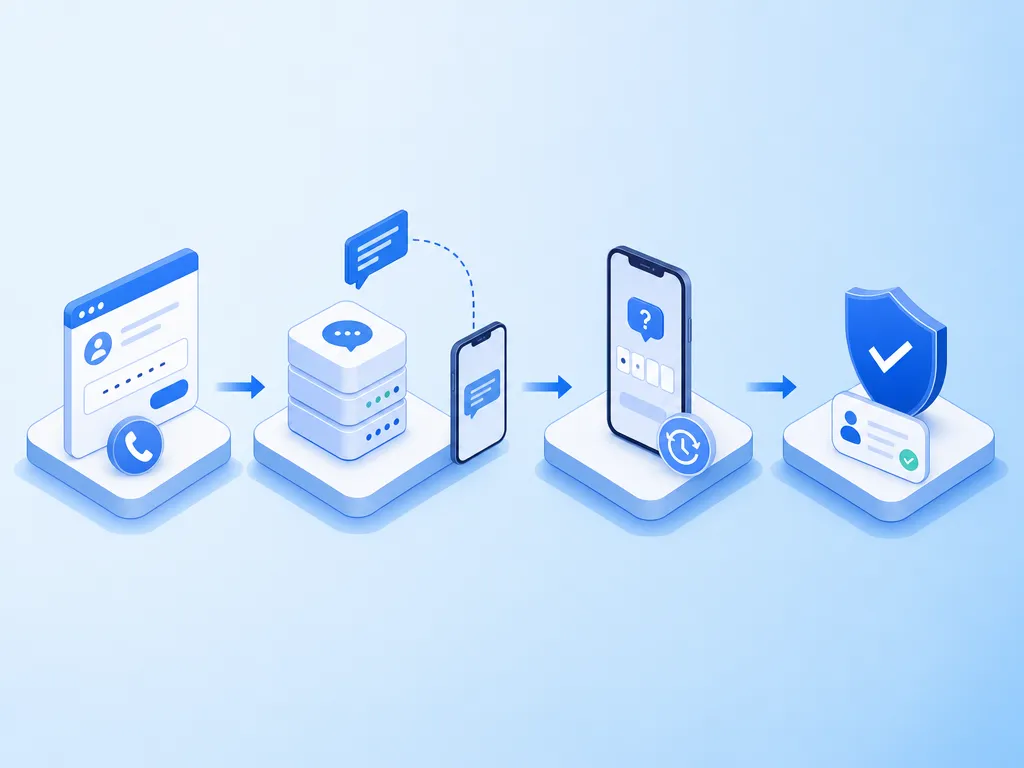
The Core Request Lifecycle
Every verification API follows the same four-step lifecycle. Understanding it before you write code saves hours of debugging.
- Request a number. You ask for a number in a specific country, for a specific service. The API returns a number plus an activation ID.
- Trigger the SMS. Your automation (or the end user) enters that number into the target service. The service sends a verification code.
- Poll for the code. You repeatedly ask the API whether a message has arrived for that activation ID.
- Finalize the activation. You mark it complete, cancel it, or request a resend.
The activation ID is the thread that ties all four steps together. Store it the moment you receive it.
Why polling instead of webhooks?
Many verification providers rely on polling because inbound SMS timing is unpredictable. A code might arrive in three seconds or ninety. Some providers offer webhooks as an upgrade, but a well-built poller with sensible backoff works everywhere. We cover backoff strategy below.
Authentication and Setup
Almost every provider uses a single API key passed as a query parameter or bearer token. Keep that key server-side. Never ship it in a mobile binary or front-end bundle, because anyone who extracts it can drain your wallet.
A typical setup checklist:
- Create an account and top up a shared wallet balance.
- Generate an API key from the dashboard.
- Store the key in an environment variable, not in source control.
- Whitelist your server IPs if the provider supports it.
With SMSBulk the same wallet funds SMS verification, the email verification API, and travel eSIMs, so you manage one balance instead of three. You can review the full endpoint reference in the developer API documentation before writing a line of code.
A Minimal Integration in Python
Here is a compact example that requests a number, polls for a code, and finalizes. Treat it as a skeleton, not production code.
import time
import requests

API = "https://api.smsbulk.net"
KEY = "your_api_key"

def get_number(service, country):
    r = requests.get(f"{API}/number", params={
        "key": KEY, "service": service, "country": country
    })
    data = r.json()
    return data["activation_id"], data["number"]

def poll_code(activation_id, timeout=120):
    deadline = time.time() + timeout
    delay = 3
    while time.time() < deadline:
        r = requests.get(f"{API}/status", params={
            "key": KEY, "id": activation_id
        })
        status = r.json()
        if status.get("code"):
            return status["code"]
        time.sleep(delay)
        delay = min(delay + 2, 15)  # gentle backoff
    raise TimeoutError("No code received in time")

aid, number = get_number("whatsapp", "us")
print("Enter this number:", number)
code = poll_code(aid)
print("Received code:", code)
Notice the backoff: it starts at three seconds and grows to a cap of fifteen. This respects rate limits while still catching fast deliveries.
Handling Errors Like a Professional
The difference between a demo and a production integration is error handling. Real traffic hits every edge case eventually.
Number not available
When a country or service pool is empty, the API returns a no-numbers error. Do not retry instantly in a tight loop. Wait, then try an alternate country from your fallback list. Many services accept numbers from several regions.
Code never arrives
Sometimes the target service simply does not send. Cap your poll window (two minutes is reasonable), cancel the activation to release the number, and either retry or surface a clear message to the user. Cancelling promptly matters because you are usually only charged for successful activations.
Rate limiting
If you receive HTTP 429, respect the retry-after header. Do not hammer the endpoint. A queue in front of your workers smooths burst traffic and keeps you within limits.

Building in Provider Failover
Single-provider setups fail in embarrassing ways: one region goes dry, and your whole onboarding stalls. Serious deployments abstract the provider behind an interface and route around outages.
A practical pattern:
- Define a
VerificationProviderinterface withget_number,poll_code, andcancel. - Implement it for your primary provider.
- Track success rate per country per provider in a rolling window.
- When success drops below a threshold, shift new requests to the fallback.
We wrote a deeper walkthrough of this pattern in our guide to building an SMS verification API with provider failover. It covers circuit breakers and health scoring in detail.
Even with failover, choose a primary provider with broad coverage so you rarely hit the fallback. Wide country catalogs reduce the number of manual retries your users experience.
Choosing Numbers: Country and Service Matching
Not every number works for every service. Some platforms block certain carrier ranges or specific countries. Two rules keep you out of trouble.
First, always request a number for the specific service you intend to verify. Providers segment their pools by service because a number that worked for one platform may be flagged on another.
Second, keep a ranked country fallback list. If your primary country is unavailable or the code fails, move down the list automatically. If you are new to how disposable numbers behave, our virtual phone number guide explains why some numbers succeed and others get rejected.
You can browse live availability across the full country coverage list to plan which regions to prioritize in your fallback logic.
Cost Control and Wallet Management
Verification is priced per successful activation, and prices vary by service and country. A few habits keep spend predictable:
- Cancel dead activations fast. Releasing an unused number avoids waste and, on most platforms, avoids charges.
- Set a per-job budget. Cap how many retries a single verification may consume.
- Monitor your balance programmatically. Poll the balance endpoint and alert before you hit zero, so batch jobs never stall mid-run.
- Batch during off-peak windows if your workload allows, since availability is often better.
Transparent per-action pricing makes forecasting easier. Review the current rates on the pricing overview and model your cost per successful verification before scaling up.
Security Best Practices
A verification pipeline touches identity, so treat it with care.
- Never log full codes in plaintext application logs. Mask them.
- Rotate API keys on a schedule and immediately if a key leaks.
- Scope keys to specific IPs or environments where possible.
- Validate on the server. Confirm the returned code matches what the user submitted server-side, never trust the client.
- Rate-limit your own endpoints so an attacker cannot abuse your verification flow to burn your balance.
If your product must decide between SMS and email delivery for one-time codes, our comparison of SMS OTP vs email OTP breaks down the trade-offs for cost, deliverability, and user experience.
Testing and Staging
Do not test verification flows against live third-party services with production keys. Instead:
- Use a staging wallet with a small balance.
- Write integration tests that mock the provider interface for unit-level logic.
- Run a small number of real end-to-end checks against low-cost countries before release.
- Log every activation ID with its outcome so you can audit failures later.
Good observability here pays off. When a country pool degrades, your dashboards should show a rising failure rate long before users complain.
When to Add Email Verification Too
Many applications verify both a phone and an email. Because SMSBulk exposes an email verification API that mirrors the SMS API, you can reuse the same authentication pattern, wallet, and client code structure. One integration mindset covers both channels, which cuts maintenance.
Decide based on your risk model. High-value accounts often benefit from both factors, while low-friction signups may need only one.
Common Integration Mistakes
- Polling too aggressively. This triggers rate limits and wastes requests. Use backoff.
- Ignoring the activation ID lifecycle. Forgetting to cancel leaks numbers and money.
- Hardcoding one country. The moment it goes dry, you are stuck. Always have fallbacks.
- Trusting client-side validation. Always confirm server-side.
- Shipping the API key client-side. This is the fastest way to get your wallet drained.
Avoid these five and your integration will already be more robust than most.
Frequently Asked Questions
How fast do codes arrive? Usually within a few seconds to a minute. Build a poll window of about two minutes to be safe, then fail gracefully.
Can I reuse a number for multiple services? Generally no. Request a fresh number per service to avoid flags and rejections.
What happens if no code comes? Cancel the activation to release the number. On most platforms you are only charged for successful deliveries.
Do I need webhooks? Not necessarily. A well-designed poller with backoff works reliably everywhere and is simpler to deploy.
Can the same API power SMS and email verification? With SMSBulk, yes. The email API mirrors the SMS design, so one codebase handles both.
Get Started with SMSBulk
Ready to ship a reliable verification flow? Create an SMSBulk account, top up a single wallet, and generate your API key in minutes. You get access to SMS verification numbers across countries worldwide, an email verification API that mirrors the same structure, and travel eSIMs on the same balance. Read the docs, drop in the polling skeleton above, add sensible failover, and you will have a production-grade integration far faster than building it from scratch.
هل أنت مستعد للتحقق من الحسابات بسهولة؟
احصل على رموز SMS فورية من 190+ دولة في أقل من 30 ثانية.