
End-to-End Testing for SMS OTP: Automate Verification in CI
Most teams test their signup and login flows carefully until they reach the one step that leaves their infrastructure: the SMS one-time password. The code travels from your backend to an SMS provider, across a carrier network, onto a handset and back into your form. That is a long trip for a test runner to follow, so plenty of teams quietly skip it. Then a config change breaks OTP delivery on a Friday evening, and nobody notices until signups flatline.
This guide shows how to build end-to-end tests for SMS OTP that run reliably in CI. You will learn when mocking is enough and when you need real phone numbers. You will also see how to write a polling helper that does not flake and how to keep the suite affordable and secure.
Why SMS OTP Breaks Normal E2E Testing
A typical browser test controls everything it touches. It clicks, types, reads the DOM and asserts. SMS verification breaks that model in a few specific ways:
- The code arrives out of band. It never appears in the page, so the test needs a second channel to read it.
- Latency is unpredictable. Delivery might take two seconds or forty. Fixed sleeps either waste time or fail randomly.
- Codes expire and are single use. A retried test cannot reuse the old code, and a slow test can outlive it.
- Rate limits bite. Your own anti-abuse rules, and those of your SMS vendor, will throttle a test that hammers one number.
- Shared numbers collide. Two parallel jobs using the same phone will read each other's codes.
None of this makes OTP untestable. It just means you need a deliberate strategy instead of bolting a phone step onto an existing test.
Three Ways to Handle OTP in Automated Tests
1. Mock the SMS provider
Your backend calls an SMS vendor through some kind of adapter. In test environments, swap that adapter for a fake that stores outgoing messages in memory or in a database table. The test then reads the code from a test-only endpoint.
This is fast and deterministic, and it adds no cost per run. The catch is obvious: you are no longer testing delivery. A broken vendor credential, a wrong sender ID or a template that fails carrier filtering will all pass.
2. Use a test-mode bypass
Some teams allowlist specific test numbers that always accept a fixed code configured in staging. It keeps UI tests simple and avoids SMS costs entirely.
The risk is that bypass logic can leak into production. If you use it, guard it behind an environment flag that cannot be enabled on production builds, and cover the guard itself with a unit test.
3. Receive real SMS on virtual numbers
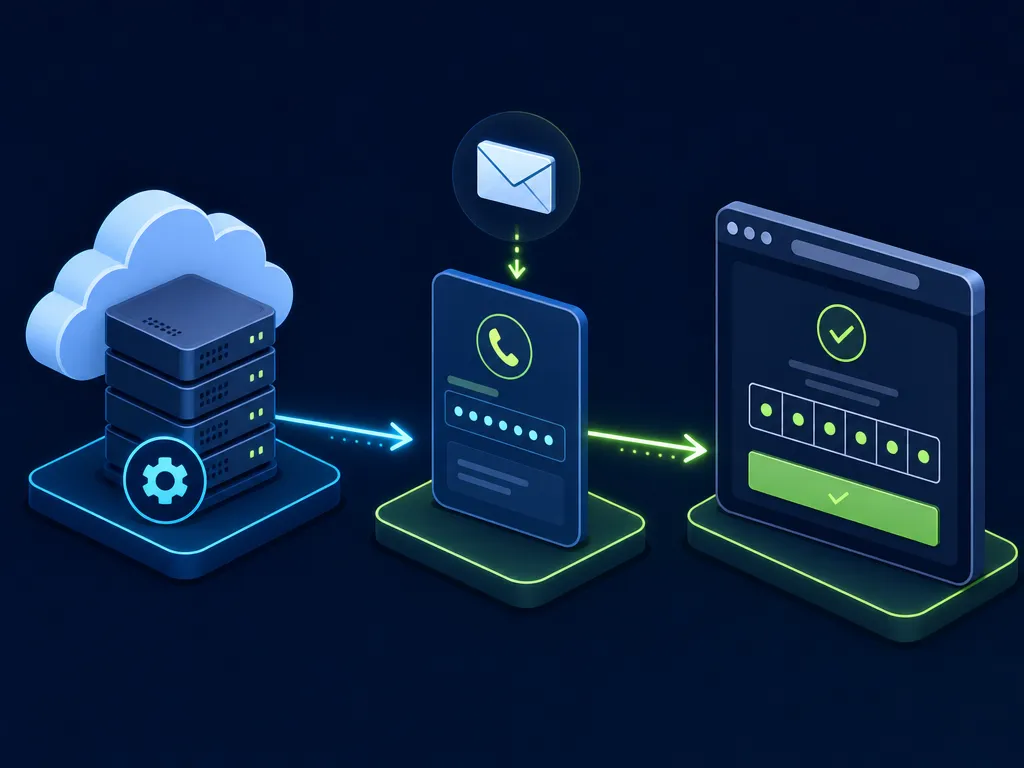
Here the test rents a real phone number from an API, submits it in your app, waits for the actual SMS, extracts the code and completes verification. This is the only approach that proves the full chain works: your code, your vendor, carrier routing and message formatting.
It is slower and each run has a small cost, so it belongs in a focused smoke suite rather than in every test.
| Approach | Tests real delivery | Speed | Cost per run | Best for |
|---|---|---|---|---|
| Mocked provider | No | Very fast | None | Unit and integration tests, every PR |
| Test-mode bypass | No | Fast | None | UI regression tests in staging |
| Real virtual numbers | Yes | Slower | Small | Scheduled smoke tests, pre-release checks |
A Practical Testing Pyramid for Phone Verification
The healthiest setup combines all three layers, weighted like a classic testing pyramid.

Unit tests (many). Cover code generation, expiry windows, attempt counters, lockout rules and resend cooldowns. These run in milliseconds and catch most logic bugs.
Integration tests (some). Exercise your SMS adapter against a mock server that mimics the vendor's API. Include error responses like invalid number, throttled and insufficient balance. Contract tests are useful here if you work with more than one vendor.
End-to-end tests (few). Run a handful of real-number flows: signup, login with 2FA, phone number change, and maybe one key country your users depend on. These catch the problems nothing else can, like a rotated API key or a template that carriers suddenly started filtering.
Building the Real-Number E2E Test
The flow has three parts: get a number, trigger and receive the code, then drive the UI. The examples below use Playwright and TypeScript, but the same pattern works in Cypress, Selenium or any other runner.
Step 1: Rent a number programmatically
Your test needs a fresh number for each run, obtained through an API rather than a shared SIM taped to someone's desk. A service like SMSBulk's virtual numbers gives you real numbers worldwide that you can order, read and release over HTTP. The exact routes and parameters live in the API documentation. The helper below uses the v1 activation endpoints described there.
Step 2: Poll for the code with a timeout
Never use a fixed sleep. Poll with a backoff and a hard ceiling, and validate the code against a pattern that matches your message template.
// tests/helpers/otp.ts
// SMSBulk REST API v1: activation endpoints.
const API = 'https://smsbulk.net/api/v1';
const KEY = process.env.SMS_API_KEY!;
const headers = { 'x-api-key': KEY, 'Content-Type': 'application/json' };

export async function rentNumber(countryIso: string) {
  const res = await fetch(`${API}/activations`, {
    method: 'POST',
    headers,
    body: JSON.stringify({ serviceCode: 'ot', countryIso }), // ot = Other (Any)
  });
  if (!res.ok) throw new Error(`NUMBER_RENTAL_FAILED: ${res.status}`);
  const a = (await res.json()) as { id: string; phoneNumber: string };
  return { id: a.id, phone: `+${a.phoneNumber}` }; // API returns digits only
}

export async function waitForCode(id: string, timeoutMs = 120_000) {
  const started = Date.now();
  let delay = 2_000;
  while (Date.now() - started < timeoutMs) {
    const res = await fetch(`${API}/activations/${id}`, { headers });
    const data = await res.json();
    const code: string | null | undefined = data.smsCode; // null until status=RECEIVED
    const match = code?.match(/^[0-9]{6}$/); // tighten to your template
    if (match) return match[0];
    await new Promise((r) => setTimeout(r, delay));
    delay = Math.min(delay * 1.5, 10_000);
  }
  throw new Error(`OTP_NOT_RECEIVED after ${timeoutMs / 1000}s`);
}

export async function releaseNumber(id: string) {
  const res = await fetch(`${API}/activations/${id}`, { headers });
  const a = await res.json();
  if (a.status === 'RECEIVED') {
    // Code arrived: mark the activation complete.
    await fetch(`${API}/activations/${id}/complete`, { method: 'POST', headers });
  } else if (a.cancellable) {
    // No code: cancel, which refunds the wallet.
    await fetch(`${API}/activations/${id}`, { method: 'DELETE', headers });
  }
  // Otherwise the 2-minute early-cancel cooldown is still running (see
  // cancellableAt) or the activation is already final. An unused number
  // is refunded automatically when it times out.
}
A few details matter here. The backoff starts short so fast deliveries finish quickly, then stretches out to avoid hammering the API. The regex should be as tight as your template allows. If your message reads "Your code is 482913. Valid for 10 minutes.", matching exactly six digits is safer than a loose range, so you do not accidentally accept a partial or malformed value.
Step 3: Drive the UI
// tests/otp/signup.spec.ts
import { test, expect } from '@playwright/test';
import { rentNumber, waitForCode, releaseNumber } from '../helpers/otp';

test('new user can sign up with SMS OTP', async ({ page }) => {
  const { id, phone } = await rentNumber('us');
  try {
    await page.goto('/signup');
    await page.getByLabel('Phone number').fill(phone);
    await page.getByRole('button', { name: 'Send code' }).click();

    const code = await waitForCode(id);
    await page.getByLabel('Verification code').fill(code);
    await page.getByRole('button', { name: 'Verify' }).click();

    await expect(page.getByText('Welcome')).toBeVisible();
  } finally {
    await releaseNumber(id);
  }
});
The finally block is important. Whether the test passes or fails, the number gets released so you are not holding it longer than needed. Also check that the phone value matches the format your form expects. Our API returns digits only, so the helper above adds the leading plus to produce E.164 (plus sign, country code, subscriber number). If your input has a separate country selector, you will need to split it. Our guide to the E.164 phone number format covers the parsing edge cases.
Running the Suite in Your CI Pipeline
Real-number tests should not run on every commit. A sensible default looks like this:
- On every pull request: unit and integration tests with the mocked provider.
- On merge to main or before a release: the real-number smoke suite against staging.
- On a schedule: the same smoke suite every few hours, acting as a synthetic monitor for delivery.
Here is a GitHub Actions workflow for the scheduled job:
name: otp-e2e
on:
  schedule:
    - cron: '0 */6 * * *'
  workflow_dispatch:
concurrency:
  group: otp-e2e
  cancel-in-progress: false
jobs:
  e2e:
    runs-on: ubuntu-latest
    steps:
      - uses: actions/checkout@v4
      - uses: actions/setup-node@v4
        with:
          node-version: 20
      - run: npm ci
      - run: npx playwright install --with-deps chromium
      - run: npx playwright test tests/otp --retries=1
        env:
          SMS_API_KEY: ${{ secrets.SMS_API_KEY }}
          BASE_URL: ${{ vars.STAGING_URL }}
Three settings do most of the work. The concurrency group stops overlapping runs from competing for rate limits. Secrets keep the API key out of logs and forks. And --retries=1 absorbs a single slow delivery without hiding a real outage behind endless retries.
If you run tests in parallel shards, give every worker its own number. Sharing one number across jobs is a reliable way to spend an afternoon debugging codes that belong to someone else's test.
Keeping OTP Tests Stable
Flaky OTP tests are worse than no OTP tests, because teams quickly learn to ignore them. These habits keep the signal clean:
- Separate failure reasons. Throw distinct errors for "number rental failed", "OTP not received" and "UI assertion failed". When the build goes red at 3 a.m., the message should tell you whether to look at your app, your SMS vendor or the test itself.
- Set a ceiling, not a guess. A two-minute timeout with backoff is reasonable for most routes. If deliveries regularly take longer, treat that as a finding, not something to tune away.
- Relax your own rate limits for test identities. Allowlist the test runner in staging so anti-abuse rules do not block legitimate runs. Keep production rules untouched.
- Rotate numbers on failure. If a number never receives the code, release it and try one fresh number before failing. Some numbers get filtered by specific senders.
- Test your failover. If your backend switches SMS vendors when one fails, add a test that forces the fallback path. The patterns in our provider failover guide translate well into test cases.
When a failure does look like a genuine delivery problem, work through the common causes in why your OTP code never arrived before blaming the test.
Security and Cost Hygiene
Automated OTP testing touches real credentials and real money, so treat it like production code.
- Never log full codes or full numbers. Mask them in test output and traces. CI logs are often readable by more people than you assume.
- Store API keys as CI secrets, scoped to the repository and environment that need them. Rotate them on a schedule.
- Cap spend. Use a dedicated account or wallet for testing, top it up with a fixed amount and set low-balance alerts. A runaway loop should drain a small test budget, not your main account.
- Only test what you own. Point these suites at your own application. Automating signups on third-party platforms breaks their terms and is not what this setup is for.
- Keep bypass codes out of production. If you use a test-mode shortcut anywhere, add a deploy check that fails when the flag is enabled.
FAQ
Should SMS OTP E2E tests run on every pull request?
Usually not. Run mocked tests on every PR and reserve real-number tests for merges, releases and scheduled checks. That balances coverage, speed and cost.
How long should the OTP polling timeout be?
Start around two minutes with exponential backoff. Tune it based on the delivery times you actually observe, and treat consistently slow delivery as a bug worth investigating.
Can I just use a physical phone for testing?
For manual checks, yes. In CI it does not scale. A physical SIM cannot be shared across parallel jobs, needs someone to read it and becomes a single point of failure.
Do I still need mocks if I test with real numbers?
Yes. Mocks give fast, deterministic feedback on every change. Real numbers verify the delivery chain. You want both.
Get Started with SMSBulk
If your phone verification flow has no automated coverage yet, start small: one signup test, one real number, one scheduled job. Create an SMSBulk account, fund a separate test wallet, and wire the number rental and SMS polling calls into your runner using the API docs. Within an afternoon you can have a CI check that tells you, before your users do, when OTP delivery breaks.
Ready to verify accounts the easy way?
Get instant SMS codes from 190+ countries in under 30 seconds.